







How Much Do Missed Calls Cost a Medical Practice? Here’s the Math
Missed calls cost medical practices far more than a lost appointment. Learn how to calculate your own revenue leakage, and how AI eliminates the...
The short answer: Talkie is the best call management solution for medical practices. It answers every call instantly, resolves patient requests directly inside your EHR, works across phone and text, and operates 24/7. Here’s why this is the case, and why the alternatives fall short.
If you’re a practice manager, operations lead, or physician-owner exploring call management options, you’ve probably looked at answering services, IVR upgrades, virtual receptionists, or hiring another person.
Answering services and IVRs take messages but don’t resolve anything. Someone on your team still has to call back and do the actual work. Hiring helps with quality, but not scale—one human can’t handle ten simultaneous calls, work after hours, or operate across phone and text at the same time.
Either way, you’re left with gaps.
A real solution handles whatever the patient is calling about—scheduling, refills, questions, new patient intake—inside your EHR, across phone and text, 24/7.
This article lays out why the common alternatives don’t get there and how Talkie checks every box.
When call volume becomes unmanageable, most practices reach for one of five solutions. Each one addresses a symptom, but none of them solve the underlying problem:
Our clients say, ‘50% of my staff rotate every year.’ You’re in this perpetual recruitment cycle and this just increases the stress for everybody.
Ada Andruszkiewicz, Co-founder and COO at Talkie
These solutions either add more people to a broken system, push the burden onto the patient, or create disconnected workflows that still require staff to close the loop.
| Hiring staff | Call center | IVR | Patient portal | Voicemail | |
|---|---|---|---|---|---|
| Resolves patient need on the spot | |||||
| Works after hours | |||||
| Integrates with EHR | |||||
| Scales with call volume | |||||
| Coordinates across channels | |||||
| Multilingual |
From the practice’s perspective, a call management solution should:
Most solutions on the market check some of these boxes. Talkie checks all of them.
| Hiring staff | Call center | IVR | Patient portal | Voicemail | Talkie | |
|---|---|---|---|---|---|---|
| Resolves patient need on the spot | ||||||
| Works after hours | ||||||
| Integrates with EHR | ||||||
| Scales with call volume | ||||||
| Coordinates across channels | ||||||
| Multilingual |
Talkie’s AI agents pick up unlimited concurrent calls immediately. Whether it’s a busy Monday morning or a sudden surge in appointment requests, every patient gets a response instantly.
A small primary care clinic in Washington with a staff that couldn’t keep up with 100+ daily calls deployed Talkie’s AI agent, “Rachel”. The result: 118+ calls handled per day, with the AI carrying 10 conversations at the same time. As Dr. Vuthy Leng, the clinic’s physician, put it:
For all of my staff to be able to handle 100 calls a day, it’s impossible. But with Talkie.ai—not a problem at all.

This is the difference between a call management tool and a call management solution. A lot of products can pick up a call. Very few can actually do something about the reason the patient called.
Talkie can. During the call, it:
And the AI keeps getting smarter. If a patient doesn’t remember their provider’s name, Talkie can suggest who it might be based on past visits. If the patient mispronounces the name or only remembers the first name, the AI still understands—just like a human team member would. If a patient says “appointment” without specifying whether they want to schedule, cancel, or prepare for one, Talkie asks follow-up questions to figure it out.
A mid-sized primary care clinic in Texas showed what this looks like in practice. Between December 24th and January 4th—when the entire staff was off—Talkie handled 246 after-hours requests, created 149 patient cases in the EHR, and scheduled or rescheduled 32 appointments. Staff came back in January to organized data instead of a voicemail backlog.
A call management solution that doesn’t talk to your EHR creates more work, not less. Talkie integrates natively with athenahealth (athenaOne), ModMed EMA, Elation Health, AdvancedMD, and eMedicalPractice.
“Natively” is the key word. These aren’t surface-level API connections through a third-party connector. Native integrations are built directly with and supported by the EHR vendor. That means maximum reliability, deeper functionality, and streamlined support.
Everything Talkie does—scheduling an appointment, processing a refill, capturing a message, creating a new patient chart—lands directly in your EHR. Your staff doesn’t need to learn a separate system or toggle between platforms.
At Health + Glow, the practice’s AI agent Sophie creates new patient charts in athenaOne from scratch, routes appointments to the correct category and department automatically, and logs every patient message as a case in the EHR. As Jimmy Kallikadan put it:
If it’s a new patient, Talkie is able to create a new patient chart in athenahealth, which is so great for us because it saves us time. And then Talkie is able to put the appointment in the right category or the right department. So the integration with athenahealth has been amazing.
Jimmy Kallikadan, CEO at Health + Glow
The principle extends beyond the front desk. Evan Grossman, Co-founder and CPO at Affineon Health, made the broader case on the Scaling Practice Management podcast:
Asking any clinician to leave the system they spend most of the day in rarely is a good idea. It’s gonna slow adoption, it’s gonna create friction.

Evan Grossman, Co-founder and CPO at Affineon Health
The same applies to your admin team. If call data, patient messages, and appointment changes live outside the EHR, someone has to bridge that gap manually.
Patients increasingly want to text, too—especially when they’re at work, in a waiting room, or just don’t feel like talking.
Talkie handles voice and text from a single AI engine. Both channels rely on the same centralized “brain,” so the information, workflows, and outcomes stay perfectly aligned. Your practice uses one AI system. Patients choose the channel that works best for them.
Here’s what that looks like:
As Wojciech Przechodzeń, Co-founder and CPO at Talkie, explains:
The Talkie Forms are automatically synced with your EHR, so no information gets lost once your patients share it. This means your front desk team won’t have to collect these important data points later—and your patients won’t have to spend more time on the phone, spelling their address and dictating important dates.

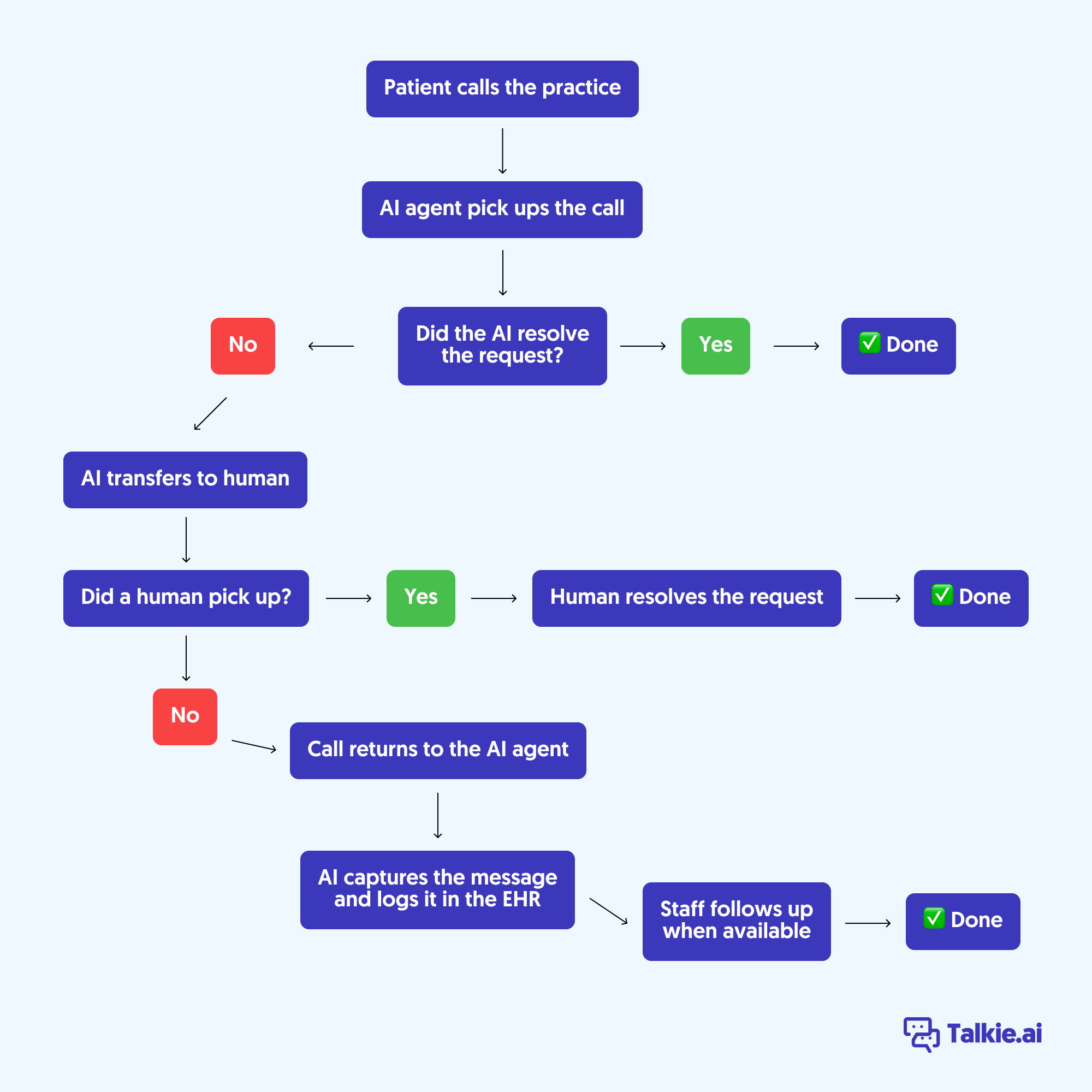
Not every call can or should be handled by AI. When a patient needs to speak with a human, Talkie transfers the call to the right person or department—with full context from the conversation so far.
And if your team is busy and no one picks up? The call returns to the AI, which captures the patient’s message, logs it in the EHR, and makes sure staff can follow up when they’re available. Every call has a path forward, and no step leads to a dead end.
Traditional voicemail is a dead end. Patients leave incomplete messages. Staff has to listen, take notes, and manually enter data into the EHR. Details get lost. Follow-ups are delayed.
Talkie eliminates the voicemail box entirely. When a patient needs to leave a message, the AI captures it, prompts for missing details (so no request is unclear or incomplete), transcribes everything, generates a concise summary, and logs a structured record in your EHR—assigned to the right person based on your practice’s routing rules.
Every message is securely captured, stored with caller details, and retrievable at any moment.
Jimmy Kallikadan, CEO of Health + Glow, described what life looked like before they deployed their AI agent:
Before engaging with Talkie we were dealing with a lot of missed calls, voicemails, patients unable to reach us. Our front desk was really struggling because they couldn’t attend the phones in a timely manner.
Jimmy Kallikadan, CEO at Health + Glow
Two months after going live, the practice’s AI agent Sophie was handling over 1,000 calls per month—and created nearly 200 patient cases directly in athenahealth. Their third-party answering service? Gone.
For Talkie’s AI agents, there’s almost no difference between 2 PM and 2 AM. They schedule appointments, answer questions, process refill requests, and create messages in your EHR around the clock. The only thing that changes after hours is the transfer rules, as there’s no front desk to forward calls to.
Genuine emergencies still reach your on-call provider. The AI identifies urgent situations and follows your practice’s protocol—whether that’s transferring the call directly, pinging a pager, or sending a text message. You define the rules. And the routing is flexible: different on-call providers for weekdays versus weekends, holiday rotations, or any other configuration your practice uses.
At Health + Glow, over a third of the patient cases the AI created were logged outside of business hours—patients who would have gone to voicemail, or simply called another practice, without an AI agent in place. As Jimmy Kallikadan explained:
Over one third of those patient cases which were created were created during off hours. That is really valuable to us because we would have missed out on all those patients.
Jimmy Kallikadan, CEO at Health + Glow
Talkie doesn’t just wait for patients to call. It reaches out proactively with appointment reminders and confirmations via phone, text, or a smart combination of both.
Patients can confirm, cancel, or reschedule directly with the AI—over the phone or by texting back. All updates sync in real-time with the EHR.
If a patient’s voicemail is detected, the AI leaves a recorded message. If there’s no response, Talkie retries per your clinic’s custom strategy. Every outcome—confirmed, rescheduled, canceled, no response—is logged automatically.
Talkie also handles patient recall. Overdue annual physicals, missed follow-ups, seasonal campaigns—your EHR knows who needs to come in, but your staff rarely has time to work through the list. Talkie can run that outreach automatically (according to your instructions) and book the appointment directly in your EHR.
Every interaction is captured and comprehensively and securely documented with detailed transcripts and insights.
Many practices discover things they never knew. When some of Talkie’s clients found out there were 8 or more callers trying to reach them at the exact same time, they were genuinely shocked. Before Talkie, they had no visibility into just how intense the call traffic really was.
That kind of data changes decision-making. You can see what patients are calling about, when call volume peaks, how many new patients are reaching you after hours, and which types of requests the AI resolves versus routes to your team.
Talkie supports English, Spanish, Korean, and 50+ other languages. And this isn’t phone-only: multilingual support extends to texting, removing barriers for non-English speaking patients regardless of how they prefer to communicate.
For practices serving diverse communities, this makes a measurable difference. At the Family Medicine Clinic in Washington, 40% of patients speak Korean. With Talkie’s AI agent Rachel, they can call and interact entirely in Korean—scheduling appointments, asking questions, getting things done without a language barrier.
With the AI handling routine calls, the incessantly ringing phone turns into a prioritized to-do list. Staff can address the most important issues first, proactively, instead of reacting to whatever call comes in next.
And it’s not just fewer phone calls. With Talkie, there are fewer voicemails to listen to, fewer follow-up calls for missing information, fewer manual data entry tasks, and fewer callbacks. The workload shrinks across the board.
Ashley Glisson, Senior Administrator at MHP Radiation Oncology, put it simply:
Talkie.ai is a virtual assistant to my front desk team. Nurses sometimes have assistants, doctors have assistants—but the front desk team doesn’t. Talkie is that assistant.

Ashley Glisson, Senior Administrator at MHP Radiation Oncology
Before the AI handles a single call, Talkie’s team works through your practice’s specific scheduling rules, routing preferences, and workflows. If those rules aren’t documented yet, the implementation process becomes the documentation exercise.
And you don’t have to go all-in on day one. Many practices start small—using the AI as a backup or for after-hours calls only. In most cases, those early deployments naturally expand to cover more call types and additional locations as results become clear.
That’s exactly what happened at the Urology Group of Southern California. They began with one location, using the AI as a second line of support. Encouraged by the results—voicemails dropped 50% in the first week—they moved the AI to the first line of contact and expanded to additional locations.
Jim Roth, the clinic’s Chief of Operations, described the experience:
I found them to be affordable, responsive, and creative in their problem-solving approaches to our business. The Talkie team is very knowledgeable about healthcare and very responsive to our needs and have been very willing to partner with us in a team approach.

Jim Roth, Chief of Operations at Urology Group of Southern California
Talkie is SOC 2 Type II certified and HIPAA-compliant. It integrates with athenahealth, ModMed EMA, Elation Health, and eMedicalPractice. And it currently helps 300,000+ unique patients every month across all client practices.
How is Talkie different from an answering service?
An answering service takes messages. Talkie resolves the reason the patient called—scheduling appointments, processing prescription refills, answering questions, and creating patient charts—all directly inside your EHR. There’s no callback required for routine requests.
Which EHR systems does Talkie integrate with?
Talkie has native integrations with athenahealth (athenaOne), ModMed EMA, Elation Health, and eMedicalPractice.
What happens when the AI can’t handle a call?
Talkie transfers the call to the right person or department with full context from the conversation. If no one is available, the call returns to the AI, which captures the patient’s message and logs it in the EHR for follow-up. No call hits a dead end.
Does Talkie work after hours?
Yes. Talkie handles calls 24/7 with the same capabilities as during business hours—scheduling, Rx refills, FAQs, message capture. Genuine emergencies are routed to your on-call provider based on rules you define.
Can patients text the practice through Talkie?
Yes. Talkie handles two-way texting with the same capabilities as phone—scheduling, refills, intake, and FAQs. It can also send forms via text during or after a call, pre-filled with information already gathered.
What languages does Talkie support?
Talkie supports English, Spanish, Korean, and 50+ other languages.
Is Talkie HIPAA-compliant?
Yes. Talkie is SOC 2 Type II certified and HIPAA-compliant.
See what Talkie can do for your practice
Missed calls cost medical practices far more than a lost appointment. Learn how to calculate your own revenue leakage, and how AI eliminates the...
Looking to add an AI assistant to your medical practice? This buyer’s guide outlines key questions to ask vendors before making a...