





After-Hours Support That Patients Can Actually Rely On
When your practice closes for the day, patients don’t stop needing help. They call to schedule appointments, ask about prescriptions, check when their next visit is—and when nobody picks up, they’re left with voicemail. Or worse, they press 1 for “emergencies” just to talk to someone, pushing routine requests onto your on-call providers.
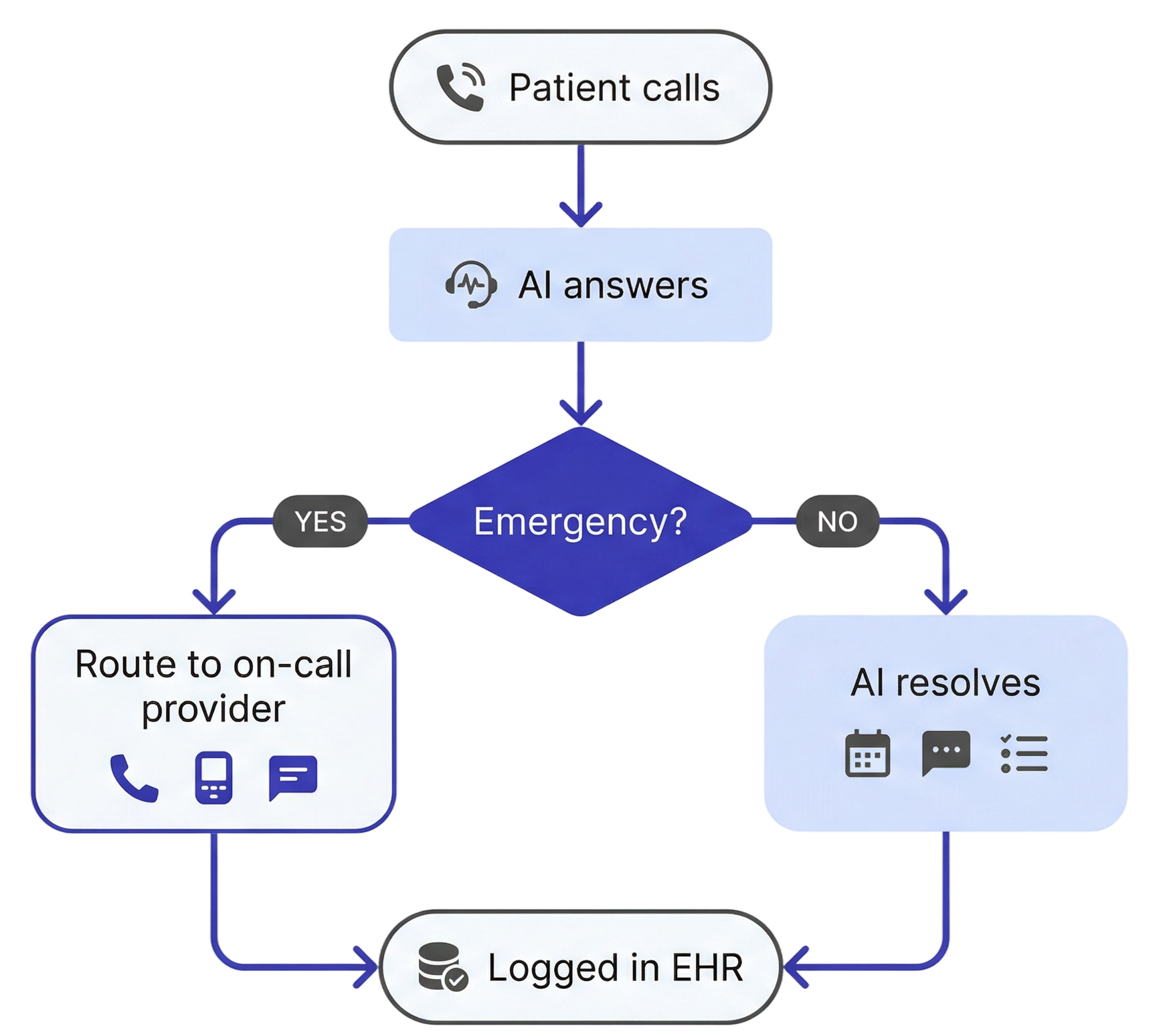
For Talkie’s AI agents, there’s almost no difference between 2 PM and 2 AM. They schedule appointments, answer questions, and create messages in your EHR around the clock. The only thing that changes after hours is the transfer rules—there’s no front desk team to forward calls to, so the AI resolves most requests on the spot and routes only genuine emergencies to your on-call provider.

Trusted by








What Talkie Does After Hours
-

Schedules, reschedules, and cancels appointments
Directly in your EHR, in real-time. Not a message saying “someone called.” An actual appointment on the calendar.
-

Creates messages and patient cases/message threads
When a patient needs to leave information for their provider, the AI captures the details, summarizes them, and logs them in your EHR. Your staff sees a clean to-do list when they arrive in the morning.
-

Answers common questions
Appointment times, office hours, directions, prep instructions. Patients get answers immediately instead of waiting until tomorrow.
-

Routes true emergencies to on-call providers
If a patient has a genuine medical emergency and needs to reach whoever is on call, the AI agent can transfer the call, ping a pager, or send a text message, depending on your practice’s flow.
-

Shields on-call providers from everything else
A patient calling at 10 PM to ask when their next appointment is doesn’t need to reach a provider. The AI handles it. Only the calls that actually require a provider’s attention get through.
How It Works

Your On-Call Providers Will Thank You
Most practices have some version of this problem: a patient calls after hours, hears an IVR menu, and presses 1 for “emergencies”—even though they just need to reschedule an appointment.
At one multi-location urology practice using Talkie, this pattern was a persistent issue. Patients pressing the emergency option for routine needs were landing on on-call doctors’ plates—which is frustrating at best and potentially dangerous at worst, because it adds noise to a channel that needs to stay clear.
With Talkie in place, the AI intercepts those after-hours calls, handles routine requests on the spot, and only routes genuine emergencies to the on-call provider.
The result: on-call providers deal with fewer unnecessary interruptions, and when a call does reach them, they know it actually matters.
Many clinics choose to start small—using the AI agent as a backup or for after-hours calls. We fully support that approach, and in most cases, those early deployments naturally expand to cover more call types and additional locations as results become clear.

Ada Andruszkiewicz, Co-founder and COO @ Talkie
Flexible Routing That Matches Your Practice
Every practice has its own after-hours protocols, and Talkie adapts to them.
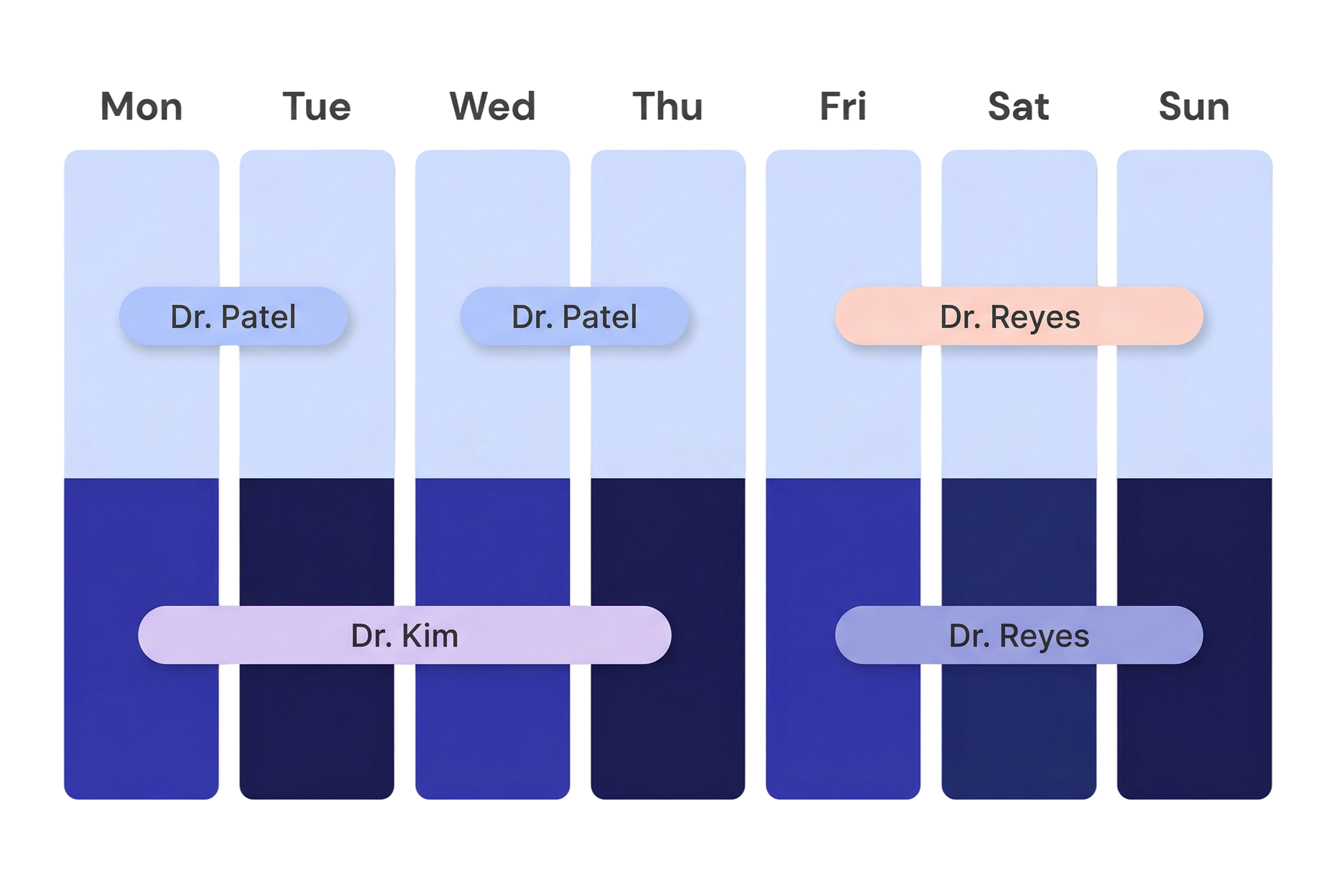
Different on-call providers during the week versus weekends? Handled. A specific provider on call Monday through Thursday and another one covering Friday through Sunday? The AI knows. Holiday coverage with entirely different routing rules? That’s accounted for, too.
The routing logic is configured based on your practice’s requirements and can be adjusted anytime, so if your on-call schedule changes, the AI changes with it.
1 in 3 New Patients May Be Calling After Hours
What happens if a new patient calls your practice at 9 PM on a Tuesday?
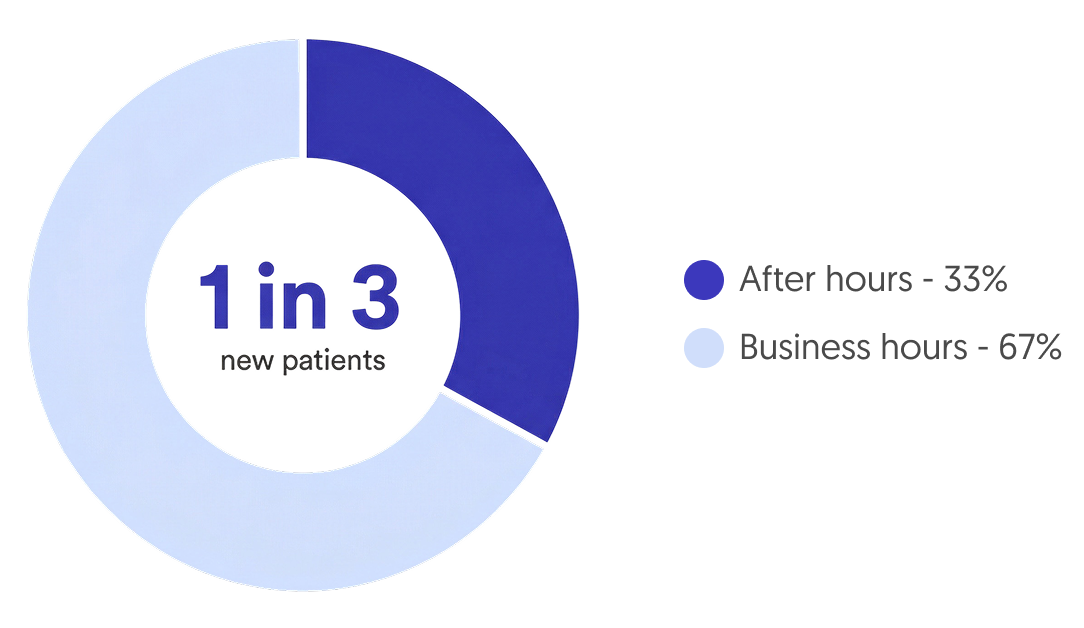
According to data from one of our clients, 1 in 3 new patient charts were created outside of clinic operating hours. These are patients who would have gone to voicemail—or simply called another practice—without an AI agent in place to capture their information and schedule their first visit.
After-hours support turns out to be a meaningful revenue channel, not just a convenience feature.
FAQ
-
Does the AI after hours can do everything it does during business hours?
Almost. The AI can manage appointments, answer questions, take messages, handle prescription refill requests, and create patient cases—just like during the day. The one thing it can’t do after hours is transfer a call to your front desk, because they’re not there. For emergencies, the AI routes the call to your on-call provider instead.
-
How does emergency routing work?
When a patient describes an urgent medical situation, the AI identifies it as an emergency and follows your practice’s protocol—whether that’s transferring the call directly to the on-call provider, pinging their pager, or sending them a text message. You define the rules.
-
Can we have different on-call providers for different days?
Yes. Talkie adjusts routing rules based on your schedule—different providers for weekdays versus weekends, holiday rotations, or any other configuration your practice uses.
-
What happens with non-emergency calls after hours?
The AI resolves what it can (scheduling, FAQs, appointment inquiries) and logs everything else as a patient case/message thread in your EHR. When your staff arrives in the morning, they have a prioritized list of follow-ups instead of a backlog of voicemails.
-
Does this work with my EHR?
Talkie integrates with athenaOne, ModMed EMA, Elation Health, and eMedicalPractice. All after-hours interactions—appointments, messages, patient cases—sync automatically.
-
Can I see how many new patients are coming in after hours?
Yes. Talkie’s reporting gives you visibility into after-hours call volume, including new patient inquiries. This data can reveal how much patient demand you’re capturing outside of business hours.